ar drone 2 firmware usb
From Pablo Ramirez at UT Dallas I'm a student at UT Dallas, and we have a ROS driver for the AR.It is an early version, and it has almost the same functionality as the ardrone_brown package. The main difference and advantage is that it is written using rosjava and javadrone. This means that no matter how broken the official SDK is on current or future versions of Linux, we could always have a ROS driver as long as a Java Virtual Machine is present. Moreover, if somebody has the skills this could be ported to Windows or Android, since it does not use native code at all. There are a couple of Wiki entries explaining how to install and use it. Suggestions and bug fixes are very welcome! Subscribe to this blog's feed This page contains a single entry by Tully Foote published on June 18, 2012 11:56 PM. ROSCon 2012 videos posted was the previous entry in this blog. Announcing the geometric-relations-semantics stack is the next entry in this blog. Find recent content on the main index or look in the archives to find all content.

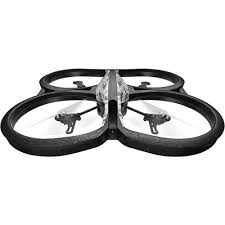
SkyJack is a drone engineered to autonomously seek out, hack, and wirelessly take over other drones within wifi distance, creating an army of zombie drones under your control. by Samy Kamkar // code@samy.pl // Dec 2, 2013 Follow me on twitter: @SamyKamkar Discover more of my technology at https://samy.pl Today Amazon announced they're planning to use unmanned drones to deliver some packages to customers within five years. How fun would it be to take over drones, carrying Amazon packages…or take over any other drones, and make them my little zombie drones. Using a Parrot AR.Drone 2, a Raspberry Pi, a USB battery, an Alfa AWUS036H wireless transmitter, aircrack-ng, node-ar-drone, node.js, and my SkyJack software, I developed a drone that flies around, seeks the wireless signal of any other drone in the area, forcefully disconnects the wireless connection of the true owner of the target drone, then authenticates with the target drone pretending to be its owner, then feeds commands to it and all other possessed zombie drones at my will.
SkyJack also works when grounded as well, no drone is necessary on your end for it to work. You can simply run it from your own Linux machine/Raspberry Pi/laptop/etc and jack drones straight out of the sky. SkyJack (available from github) is primarily a perl application which runs off of a Linux machine, runs aircrack-ng in order to get its wifi card into monitor mode, detects all wireless networks and clients around, deactivates any clients connected to Parrot AR.drones, connects to the now free Parrot AR.
parrot ar drone lawsuitDrone as its owner, then uses node.js with node-ar-drone to control zombie drones.
parrot ar drone wie hoch I detect drones by seeking out any wireless connections from MAC addresses owned by the Parrot company, which you can find defined in the Registration Authority OUI.
parrot ar drone manila
I use aircrack-ng to put our wireless device into monitor mode to find our drones and drone owners. I then use aireplay-ng to deauthenticate the true owner of the drone I'm targeting. Once deauthenticated, I can connect as the drone is waiting for its owner to reconnect.
phantom 2 drone buy I use node-ar-drone to control the newly enslaved drone via Javascript and node.js.
ar drone 2 mediamarktDrone 2 is the drone that flies around seeking other drones, controlled from an iPhone, iPad or Android, and is also the type of drone SkyJack seeks out in order to control.
parrot ar drone 2 vs 1SkyJack is also capable of seeking out Parrot AR. The Parrots actually launch their own wireless network which is how the owner of the drone connects. We take over by deauthenticating the owner, then connecting now that the drone is waiting for its owner to connect back in, exploiting the fact that we destroyed their wireless connection temporarily.

I use a Raspberry Pi to drive the project as it's inexpensive, reasonably light, has USB, and runs Linux. I use the Alfa AWUS036H wireless card which supports raw packet injection and monitor mode which allow me to deauthenticate users who are legitimately connected to their drones. I also use the Edimax EW-7811Un wireless USB adapter in order for SkyJack to launch its own network. This allows me to connect to SkyJack from my laptop or iPad and watch all the other drones as they're being controlled. I suggest any USB battery which is light (under 100 grams), and can output close to an amp (1000mAh). The Raspberry Pi + wifi will likely use about this much juice. You could also possibly hook up three AAA batteries together to get about 4.5V out which would be a bit lighter, though I'm not sure how much current it will be able to output. Feel free to contact me with any questions! You can reach me at code@samy.pl. Follow @SamyKamkar on Twitter or check out https://samy.pl for my other projects.

A little good / bad news for those dads who scored an AR.Drone 2.0 for Father's Day over the weekend. It's already time to upgrade. Starting next week, Parrot will be offering up those new add-ons it announced way back at CES. The "black box" Flight Recorder has been priced at $130, adding the ability to save flight data and GPS information from runs, which can be viewed in 3D through AR.The device plugs into the quadcopter's USB port, bringing 4GB of storage that can also be used to save up to two hours of HD video. The Recorder also lets users perform simple piloting maneuvers via smartphone and tablet. The high density battery, meanwhile, has been priced at $70, bringing 18 minutes of flight time to the 'copter. Both are available now through Parrot's store. On the software side, the $3.99 2.0 piloting app brings Director Mode to the flier, giving users more control over the video they shoot with their drone, including editing and picture settings like white balance and saturation.

Parrot's offering the Rescue Mode update for free, meanwhile, with random shake and over balance settings to help rescue your drone from quadcopter-eating trees.Drone 2.0: Flying further, faster, higher!In June, Parrot offers AR.Drone 2.0 fans' to experience even more astonishing flights:• Flights displayed on 3D, video storage and GPS localization thanks to the new Flight Recorder module;• Access to Director Mode feature for filming the world from the sky like a pro;• Increased flight time by 50 percent thanks to a new High Density Battery.With new features and accessories, beginner and expert pilots will benefit from the most advanced technology and limitless flights!Flight Recorder: The black box...As black boxes are standard on commercial aircrafts, Parrot AR.Drone 2.0 will now have the option to utilize the new Flight Recorder system, which can save flight data and GPS-localized information.When plugged into the Parrot AR.Drone 2.0, this module can accurately (+/- 2 meters) save the exact position of the quadricopter throughout each flight.

The collected data can be viewed in 3D and can be analyzed through the AR.Equipped with a 4GB Flash memory; Flight Recorder also can record approximately two hours of HD video. This content can be easily shared with the AR.Drone community via the AR.Drone Academy.Flight Recorder provides access to two additional unique features:• « Click & Go » Piloting ModeThanks to the Flight Recorder module, the pilot and its quadricopter and geolocalized on a map. One click on the piloting smartphone or tablet screen and pilot defines a destination. After adjusting the flight altitude and speed, the Parrot AR.Drone 2.0 will reach the selected destination (depending on Wi-Fi range).• « Return Home » featureOne click on the Home button and the Parrot AR.Drone 2.0 goes back to its original departure location.For expert pilots:The Flight Recorder module is compatible with MAVLink Open Source communication protocol and can be used with QGround Control solution for defining flight routes.Also, team at the Delft University of Technology integrated the open source high end autopilot software, paparazzi, in the AR.

There is no need to change the AR.Drone hardware but only to plug in the Parrot Flight Recorder. Next step is to have a laptop with paparazzi on it, to connect the laptop Wi-Fi to the AR.Drone, to launch paparazzi and to click on « compile » so that the software will be put on the AR.You're now ready to fly!/ and at select stores.Price: $129.95 USDFor immediate release Paris, June 17, 2013Director Mode: Film like a pro!Pilots equipped with an iPhone®, iPad® or iPod touch® can benefit from the Director Mode feature, which is available through the Parrot AR.Drone 2.0 piloting app.This feature gives pilots the opportunity to create smooth videos using nine pre-registered movements (forward/backward travelling, panoramic, crane, etc.) allowing them to modify speed before or during flight.• Camera settingsDirector Mode feature offers a number of different camera settings, including: white balance, saturation, exposure, etc.• Post-production settingsTo achieve a clear view from the sky, Director Mode offers advanced video settings.

While watching a previously recorded AR.Drone 2.0 video, a graph highlighting image vibrations is displayed on the smartphone or tablet piloting screen. The pilot can then select sequences to post-production edit for improving image stability.• Sequences editsIs your video from the Parrot AR.Drone 2.0 too long? Sequences not interesting enough? Pilots can easily select sequences to keep or delete in just a few clicks. The software also can edit sequences to create a new video.All videos can be shared from the piloting app on YouTube, Facebook or the AR.Drone Academy.Director Mode: $3.99 USD*The piloting app must be up-to-date to download Director Mode and is currently available on the App Store℠ (Android™ version will be available in September).High Density Battery: Fly more...Thanks to the new High Density Lithium-Polymer battery, available as an optional accessory, Parrot AR.Drone 2.0 can fly non-stop for 18 minutes! and in select stores.Price: $69.95 USDBonus: 'Rescue Mode'Due to piloting errors or bad weather conditions, Parrot AR.